Installing a Massive Curved Display Case Study

Case Study

AVIXA Case Study – Massive Curved Display

For more information on this case study contact [email protected].

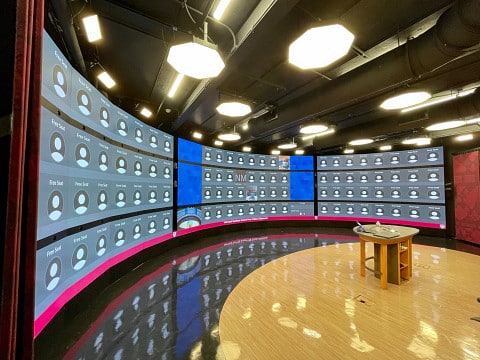
With the goal of creating a more immersive remote learning environment for students of the university, the Peerless-AV team worked diligently with its SEAMLESS dvLED Video Wall Integration Program to design, engineer, and create a custom SEAMLESS Custom Mounting System. Despite facing unique challenges, the team successfully installed a massive, curved digital display to keep the classroom environment collaborative and inviting to all students.

The Need

Approached by McCann Systems for a world-renowned university, Peerless-AV® was tasked with installing (2) custom direct view LED (dvLED) video wall systems alongside Unilumin. In January 2019, the university wanted to create remote learning classroom environments, which would allow professors and faculty to move around while speaking and delivering presentations. For the students, the benefit was to be able to invite them into a conversation and present materials to classmates, as if they were attending in-person.

Case Study

Curverd Display Installation

Click for full size – Curverd Display Installation

The main challenge that the university faced was building a completely custom solution that would fit within the existing architecture of the two studios, both square in size and with low ceilings. In addition, all teams invested a lot of special design and engineering resources, all while navigating through scheduling issues due to the COVID-19 pandemic.

The Solution

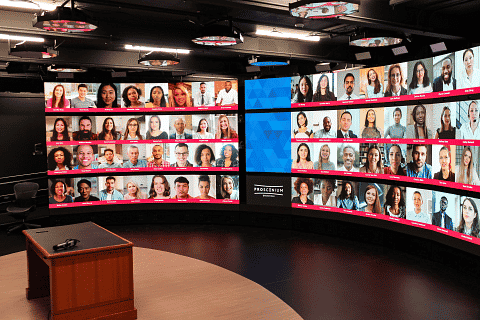
The university selected Proscenium, the connected studio environment from McCann Systems, as their solution. McCann Systems and Unilumin recognized that Peerless-AV was the only manufacturer whose mounts would work successfully for this custom installation.

Peerless AV was also chosen for its long-standing relationships with McCann Systems and Unilumin. Known for its flexibility, cost effectiveness and superior customer service, SEAMLESS by Peerless-AV, the company’s dvLED Video Wall Integration Program, ensures start to finish project support – from the design/manufacturing of custom Bespoke Series Mounting Systems to on-site installation support.

No matter how complex the installation, the entire Peerless-AV Solutions Team is available every step of the way

For the project, Peerless-AV custom-designed two 180-degree, 33′ wide by 10’high (10m x 3m) pedestal mounting structures that are freestanding and bolted to the floor. The mounting systems needed to accommodate 168 Unilumin UpanelS 1.5 displays (610 x 343mm). The final configuration of both walls would incorporate 12 bottom row half height displays (36 modules) and 2 custom displays (8 modules) with a total pixel count of 14,839,799.

Construction of the classrooms took place throughout 2019 and, in early 2020, Peerless-AV was on site for the installation of the video walls; from the moment the teams arrived on site, they required extreme attention to detail for such a precision engineered installation. Since there was no way to attach to the walls, a pedestal mounting structure would be designed to provide a stable floor standing solution.

Each of the rooms presented additional unique challenges due to room limitations. The first studio room included stairs, an ADA ramp, and a raised walkway to allow for maintenance access. Additionally, the classroom entry opens to the rear of the video wall, so Peerless-AV added aluminum cladding on the rear of the mounting structure to conceal the electrical components and create a sleek, finished appearance. The second studio room was not the same size as the first, so Peerless-AV had to design this video wall structure differently from the video wall in Studio 1 to fit the space
accordingly and create access for maintenance behind the video wall.

In addition to the custom dvLED video wall mounting systems, Peerless-AV also designed and manufactured hardware for the integrated technology solutions needed for the video walls. This included custom mounts for the four integrated web cameras in each section, (providing 56 total viewing angles), two speakers on each camera, and seven subwoofers at the base of every wall section. Six PTZ 4K web cameras were also installed.

The Covid-19 pandemic delayed the installation, and all parties were back on site to complete in the summer of 2021. The precision engineering and tight manufacturing tolerances along with x, y, z adjustment on Peerless-AV’s mounting structure was essential to ensure all the Unilumin displays showed no visible lines between the panels, and to achieve perfectly flat planes at all angles of the curve on both video walls.
The Results

The university was thrilled with the outcome of both video wall installations, allowing them to create their ideal environment for virtual classes comprised of more than 90 students in a single session. The professors can now conduct lectures as if they are in a TV studio with a control room. Each student’s image is separated on the curved dvLED video wall in front of the professor, allowing for a more personal connection with students than traditional lectures conducted in a typical conferencing service.

Case Study Download

The original case study can be found here. The pdf below is a compressed PDF and may have some fidelity issues.  A 800K file is much easier than a 5MB file.

Massive Curved Display Case Study

Companies Involved

Related Posts

Korean 3D Illusions Signage July 2022

3D Illusions Signage

Digital Signage 3D Illusions — TEASER OF DIOR SEONGSU CONCEPT STORE

Brand eXperience Design

A couple of recent examples of 3D Illusions Signage and also supplementary large screen displays for Inchon Airport and their Digital Gym.  For more information email [email protected]

APR. 2022

d’strict showcased a very special digital signage 3D illusion content to commemorate the opening of Korea’s first Dior concept store ‘Dior Seongsu’ in May 2022.

Special Dior Codes are presented sequentially in the glass cabinet, transforming into one of the most enchanting stores. It flows gracefully and softly, as if watching a Dior fashion show.

The lucky star that changed the fate of Christian Dior,
The sketch of a new look that shocked the world,
The Dior dress that wrote a new chapter in fashion history,
Gardens of Dior, the source of inspiration that never dries up,
And finally Dior Seongsu, which embraces all these, magically appears.

This wonderful and new experience that transcends time and space takes you into the world of Dior and gives you the feeling of anticipation for Dior Seongsu.

d’strict will continuously create and provide innovative offline marketing content for global companies and communities.

TEASER OF DIOR SEONGSU CONCEPT STORE from d’strict on Vimeo.

Comments and Other Notes

Sixteen-Nine Calls it “Probably the Best 3D illusion Yet Done” —  writeup article The creative was, not surprisingly, done by the Seoul agency D’Strict, which has somewhat specialized in producing amazing large format content for LED boards like this one, in a Seoul commercial district. The company is the one that first generated widespread attention for these anamorphic illusions, a giant wave sloshing above the Seoul sidewalk.

INCHEON AIRPORT DIGITAL GYM

The experiential digital sportainment solutions – Jumping, Stepping, Touching, and Shooting – invite passengers to engage in and enjoy an array of indoor sports activities through digital devices in the transfer amenities at Incheon International Airport Terminal 2.

INCHEON AIRPORT DIGITAL GYM from d’strict on Vimeo.

More Posts

Accessibility and Digital Menus For Restaurants

digital menu accessibility

Digital Menu ADA & Accessibility

There’s no question that restaurants and other businesses have made strides in making their establishments more accessible. But even with the increased accommodations that have been implemented, there is still work to be done. That’s why we’re asking the question: should restaurant accessibility standards include digital menus?  Article reprinted from Keyser, a major provider of digital signage displays and digital menu boards.

The short answer is yes! Digital signage can help improve accessibility by providing menus and other information about the restaurant digitally. Digital menus can help restaurants become more accessible and inclusive by making it easier for customers who have trouble reading print or following spoken instructions over the phone. Digital menus don’t just increase sales at restaurants, they make dining out more enjoyable for everyone.

[Drive Thru might be the singlemost largest sales stream for fast food restaurants.  It is estimated McDonalds sales are 65% via drive thru lanes. Now imagine placing TVs outside in blazing sun, or in freezing blizzard]

Digital menus help increase accessibility through simple, intuitive operability and great design, allowing customers to find what they want at every point of their dining experience. Like most public spaces, restaurants are not easily accessible for all. However, digital signage may be able to help increase accessibility for many people. This blog will discuss today’s restaurant accessibility standards, and the role that digital signage can play in creating a more inclusive dining environment.

So, what does accessibility mean?

The idea of “accessibility” is a pretty broad one, with the general definition being something easy to obtain or use. Within the context of restaurants, this means providing the necessary accommodations for every customer to be served. There are all sorts of ways to make things more accessible: making sure there’s plenty of parking spaces, making sure locations have accessible entrances and that doors are wide enough for wheelchair users, having ADA-compliant restrooms, wheelchair accessible seating areas, etc.

One thing that hasn’t been considered much in the past is whether digital menus should be included in accessibility standards—if it wasn’t clear enough already, we think they should. So when we talk about restaurant accessibility standards, what we’re really talking about is making sure that all customers—including people with disabilities—can easily get into restaurants and order their food without needing much assistance from staff members or other patrons.

What does accessibility look like for restaurant customers?

restaurant-accessibility

If you’re a restaurant owner, you may have heard the term “accessibility” thrown around quite a bit lately. It’s on your mind because it’s important—and it should be. Accessibility has always been an essential part of the quick-service restaurant industry because restaurant business models are built around ease and convenience. Restaurants want to be able to provide a great experience for their patrons, and one of the most important factors in that experience is how quickly you can get your food. If you don’t have an accessible digital menu, then it can take longer for a customer’s order to go through, which means that if there is anything wrong with it (for example, if the order comes out wrong), then the customer will have even less time to fix it before they need to leave.

But for disabled people who may have different requirements for what accessibility is, these accommodations are integral to being a consumer. For example, people who are deaf or hard of hearing may use ASL when communicating with others, which means that the traditional way of ordering food may be difficult for them, especially if none of the employees know ASL. In this case, a self-service kiosk may be the preferred option for this consumer. People who are blind or have low vision might need large print or braille menus. In either case, if restaurants do not offer these types of accommodations, then customers will not be able to order their food as easily as they would like them to.

The importance of quick access to food for people with disabilities cannot be overstated. Populations with disabilities experience greater risk of food insecurity, so the accessibility of fast food restaurants can actually be a very necessary fixture in people’s lives. 26% of adult Americans have a disability, and they deserve equal treatment from businesses. It’s the job of restaurant owners to provide accessible service options for all consumers.

What types of digital signage may help restaurant accessibility standards?

restaurant-accessibility

The ADA (Americans with Disabilities Act) requires that restaurants provide equal access to all their customers, including those with hearing or visual impairments. One way to ensure this is by incorporating digital signage for guests. Here are the different types of digital signage that can help with restaurant accessibility standards:

  1. Restaurant kiosks: The rise of restaurant kiosks has improved the accessibility of restaurants, as they can be used by people with disabilities to place orders, pay for meals, etc. They can also be used by non-disabled customers to learn more about the restaurant and its offerings, and to simply provide more convenience. This can help reduce wait times for customers who would otherwise have to wait for staff members to complete tasks like printing out menus or taking orders.
  2. Digital menu boards: These are screens that display food and drink options for customers waiting in line at fast-food restaurants or drive-thru windows. Digital menu boards are another tool that restaurants can use to make their menus more accessible. They can display the same information as a paper menu but in a much more user-friendly format that allows customers to read it without assistance or strain.
  3. Drive thru menu boards:  id=”urn:enhancement-bf30b58a-6fff-4c1e-8ad1-52ba83631d2b” class=”textannotation disambiguated wl-thing” itemid=”https://data.wordlift.io/wl148982/entity/drive-thru”>Drive thru menus can be difficult for those who are visually impaired or have other disabilities that make it difficult for them to read from afar. Digital drive thru menu boards are similar to digital menu boards, but they can often be larger because they’re designed to be read from inside cars rather than outside of them. In addition, drive thru menu boards provide accommodations for people with physical disabilities that prevent them from entering a store.

How can digital signage provide more accessibility?

Digital signage can be a great addition to your restaurant’s accessibility. One way restaurants can become more accessible is by using digital menus. Not only does it provide an easier process for deaf and hard of hearing patrons, but it also provides an easy process for neurodivergent people who may have a difficult time communicating verbally. Whether a customer has physical disabilities or they have emotional/mental ones like anxiety or depression, we know that providing more diverse service options facilitated by technology is the best way to accommodate everyone.

Interested in Digital Signage for Your Restaurant?

If you’re a restaurant owner, you’re probably already thinking about what your business needs to do to make sure that your customers can enjoy an accessible dining experience. When it comes to digital signage and restaurant accessibility, it’s all about making sure that every customer has an enjoyable experience at your business. If you are a business owner who wants to create a more accessible restaurant, what are you waiting for? Contact Keyser today to get started!

More Posts

More Digital Menus Posts by Digital Signage Blog

Best Digital Signage Linux – also Raspberry Pi support

linux digital signage

Linux Digital Signage OS and Media Player

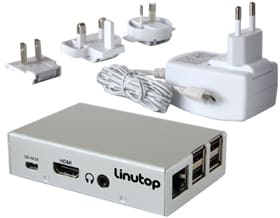
Pretty interesting option by LinuxTop ($189 Euro) for complete media player and OS for digital signage or kiosks.

-Memory:1 GB RAM & 16 GB internal flash
-Quad Core 900Mhz (ARM)
-OS Linutop OS XS preinstalled
-Size 9x6x2,4 cm (3.6×2.4×1 in) Weight: 92g (3oz)
-Power: 4W (100-240 AC adapter)
Use: Digital signage player (video hd,PDF, …) -Includes: US, UK, Europe and Australia power plugs
-1 HDMI, 4 USB2, 1 Ethernet
-Software: Epiphany, Libre Office, VNC, Linutop Kiosk, VLC
-Silent
Full featured Digital Signage Player

Comments

  • The kiosk versions supports either Firefox or Chromium engines and available for Raspberry Pi.
  • Libre Office (MS Office compatible) is supported
  • Kiosk is euphemism for controlled browser with no external device support – that’s a little disappointing and only informational “kiosk”

Support

Technical Documentation

– Linutop OS – Operating system
– Linutop Kiosk – Signage Player and Kiosk
– Linutop TV – Digital Signage

linutop_developers.jpg

WIKI – Help for advanced users

Support contact – Access the form

Marketing Documentation

 Brochure Linutop OS
 Brochure Linutop XS
 Brochure Linutop 6
 Brochure Linutop.TV
 Quick user guide for Linutop 2, 3, 4, 5 & 6

Linux Kiosk FAQs

Table of Contents1. About Linutop-Kiosk

Overview
Getting started with the configuration

2. Secure Web Browser

Web Kiosk browser tab
Parameters
Interface
Using an external browser
Restrictions
Web Kiosk browser Security tips
Using the browser

3. Digital Signage Player

Playlist and Formats
Playlist management
Multimedia Formats Compatibility
Playlist source configuration
Screen formats
Linutop TV Server (WEB or Private)
Local playlist (and shared folder)
Updated by USB key
Display settings
Player settings
Other options
Local remote control
Activation
Connection
Using Linutop remote control
Direct display
Direct template
Direct template example
Sample Template

4. Digital Signage with Linutop TV5. Network settings

Proxy settings
Linutop Kiosk Network configuration

6. FAQ & Advanced configuration

FAQ
How the Kiosk application works
Mini-server of automatic diffusion of the media on local network
External applications
Type of slideshow items
Hooks
Prestart script
DBus interface
Scheduler (Advanced use)
Loops
Date and time
Example
Adding a font to the system
Prevent thunar network access

7. Quick configuration- Tutorials

More Linux Digital Signage Posts

Google Kiosks & Google Signage Interview by Sixteen-Nine

Chrome Enterprise for Digital Signage Kiosks

Google Kiosks & Google Signage News

Dave Haynes of Sixteen-Nine had Naveen Viswanatha of Google on a recent podcast to talk about Google Kiosks and Digital Signage. Here is the website and podcast link. (Screenfeed was sponsor).

Editors Note: Kiosk partners closest is MeldCX and they use kiosks from American Kiosks.  A major kiosk manufacturer they are at Hitec next week in Orlando and they will have a kiosk there with Chrome OS computer and MeldCX.  The demo will show AI based check-in, identity verification, object recognition, secure payments, and other operational efficiencies to improve the customer experience. For more information or arrange a demo at the show email [email protected]

In Brief

  • Chrome Enterprise Recommended
    • ensures security and data safety
    • reduce maintenance times
    • Monitor, control and manage stations
    • end to end integrated solution
    • Nine digital signage software (aka cloud) partners
  • Google trial ballooned this back in 2015
  • Recently has “beefed up” the kiosk and digital signage solution area
  • The huge increase since pandemic has been in education. We can vouch for that.
  • The return to work since pandemic has energized the work environment
  • Recently, Google sees additional trends lined up with ChromeOS so Google is investing in kiosks and digital signage (again)
  • End to end solution – four components –
    • capabilities of OS which includes Security, APIs, core functionality
    • management
  • Appleistic validation and regression testing of solution partners (nine of them)
  • Partners typically develop web-based apps that are lightweight, robust and work well on Chrome as a web-based operating system.
  • Bluescreens are bad (poke at MS)
  • Zero ransomware attacks ever reported on Chrome OS
  • Security is baked into the OS, not a bolt-on
  • Flex lets you repurpose old PCs into cloud-PCs (or thin clients)
  • ChromeOS good for fixed-point kiosk. Android might be better (ie tablet iteration) for mobile.
  • Pricing – $25 per device per year gets ChromeOS (not sure about Flex)

Comments

  • Is this partially or wholly the end result of Neverware aka CloudReady acquisition?
  • Kiosk partners. Really don’t see any. Closest is MeldCX and they use kiosks from American Kiosks. They are at Hitec next week in Orlando and they will have a kiosk there with Chrome OS computer and MeldCX.  The demo will show AI based check-in, identity verification, object recognition, secure payments, and other operational efficiencies to improve the customer experience. 
  • Something to be said for generational incubation.  Used to be we all shopped as adults at stores our parents took us shopping to as kids.  Later in life those grown up kids tend to shop at that same stores.  Or convincing kids that smoking or vaping is cool and proves you are grown up. Now the schools enable the students, the kids adopt and learn the computer (Chromebook) and in many cases migrate that preference to their parents. For sure Google won the Education segment hands-down. Microsoft tried but failed.
  • Linux – that’s complicated isn’t it?  Though worth noting the these days MS is liberally borrowing from Linux the desktop and widgets along with streamlining patch/system updates. Linux is a lot like Android (cloud driven) but Linux is more reliable than Android and supports any number of devices
  • What OS is ChromeOS derived from (Android and IoS are Linux)
  • Not a single word about Privacy. I wonder if smart city kiosks might be ideal for Chrome-based kiosks.  Generally those units are offered for free (Houston, Tampa, NYC, etc) and selling data would seem to be their only corresponding revenue play.
  • The word “device” is used 39 times but there isn’t a single mention of an actual device (barcode scanner, camera, POS terminal). Device is used instead of “station” or endpoint or terminal or PC with a screen.
  • No mention of touchscreens
  • Is there a video on YouTube demonstrating the interface? Would be nice to see.
  • What about kiosk networks where you have a mix of terminals (Windows legacy e.g. and perhaps Android)?  Those cannot be monitored?
  • Pricing – $25 per device per year gets ChromeOS — It’s been awhile since we reviewed the MS pricing for IoT Devices but last I checked it was $34 (one-time) for the lower processor tier Celeron Win10 Ent LTSB (which lets you turn off updates and manage them yourself)
  • We actually are a certified reseller for Chrome for Education and Workplace and had to go thru training and certification at Google.  Its fairly involved administering Chromebooks and the depth of granular control is impressive (and can be daunting at times). For school children you definitely want that depth of control. For kiosks, one only needs to administer via a mature kiosk remote control agent like Sitekiosk or KioWare or Nanonation or 22miles and its day and night difference on what elements are focused for alerts and configs.
  • We wonder about filtering. There is no porn filter?  What about hacksites?
  • What about different layouts, templates, zones?
  • What about screen readers and assistive technology?
  • What about WCAG?
  • Many in-house administrators have tried to configure Windows, and failed in one way or another.
  • Related links

Excerpt

You mentioned a new SKU. What is that? 

Naveen Viswanatha: Yeah we’re very excited about that. The new SKU is called the kiosk and signage upgrade, and what it does is it unlocks all of the signage capabilities that an organization wants, but none of anything else that you need. And what I mean by that is that Chrome OS is an operating system that serves end user computing, as well as signage. On the end user computing side, you need capabilities to manage users, user profiles, logins, different types of login modalities. But on the signage side, you don’t really need that, right? Even if there’s end user interaction, there’s a lot of user modes and user capabilities that are not part of that overall management…

Because it’s a dumb end point in a hell of a lot of cases? 

Naveen Viswanatha: I wouldn’t use the word dumb, but because it’s a highly focused endpoint, and as a result of that, we tailored a SKU which is $25 per device per year. So that’s half off, two bucks a month basically, enterprise SKU, and for that, you get this 50% off SKU and very focused functionality, still gives you all the security, all the device controls, cloud management, reporting and insights. You just don’t get the user controls that you get with the Chrome enterprise upgrade SKU, and that’s the full SKU. 

But if you did want those user controls, for whatever reason it may be, could you use those? And could you run a blended network with both kinds of licenses? 

Naveen Viswanatha: Absolutely and we have a lot of customers that that, that are doing exactly 

Related Posts


Digital Wayfinding Video from InfoComm

digital wayfinding

Interactive Smart City Wayfinder by Nanonation and Display Devices

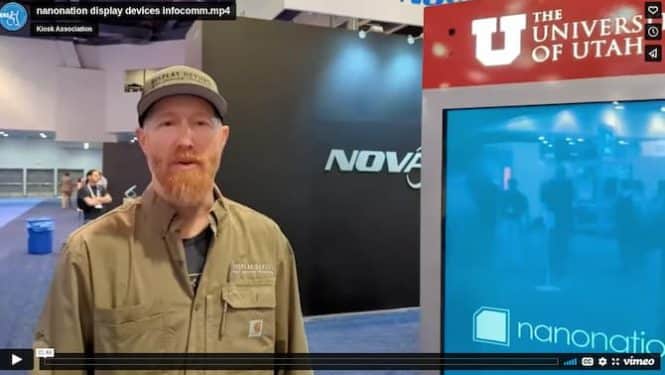
Nice video from InfoComm of Digital Devices doing a demo of their interactive smart city digital wayfinding that Nanonation did. From LinkedIn

Check out Dave Schmitt from Display Devices showing off their outdoor Smart City Kiosk powered by Nanonation‘s interactive Smart City Wayfinder at #infocomm. A great way for communities to engage with visitors and residents. Learn more about how Nanonation, along with partners like Display Devices, can help you deliver impactful community kiosk solutions at nanonation.net/wayfinding/

More Posts Digital Wayfinding Nanonation

Transportation Case Study – London Underground Digital Signage

digital signage software cms

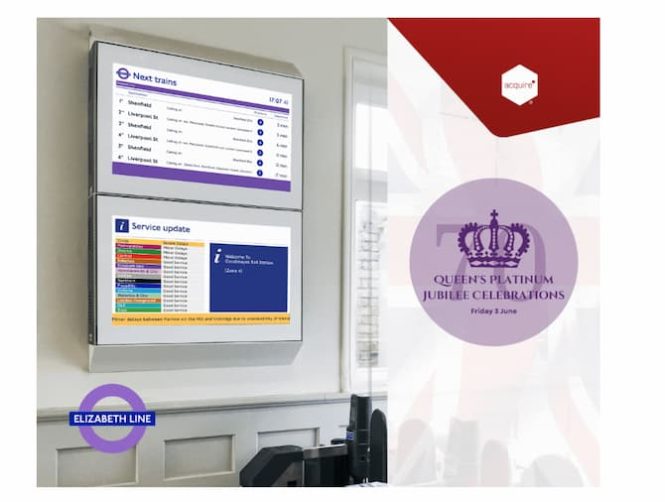
Acquire Digital’s iconic Elizabeth line rebranding and live status screens

Acquire Digital , the provider of smart interactive digital signage has announced that they recently delivered the iconic rebranding of the live status screens for the new Elizabeth line of The London Underground.

Travelled on the new Elizabeth line yet?

If you haven’t done so already, try to make some time to frequent the iconic Elizabeth line and see if you can spot the new live status screens. They look great and are worth checking out!

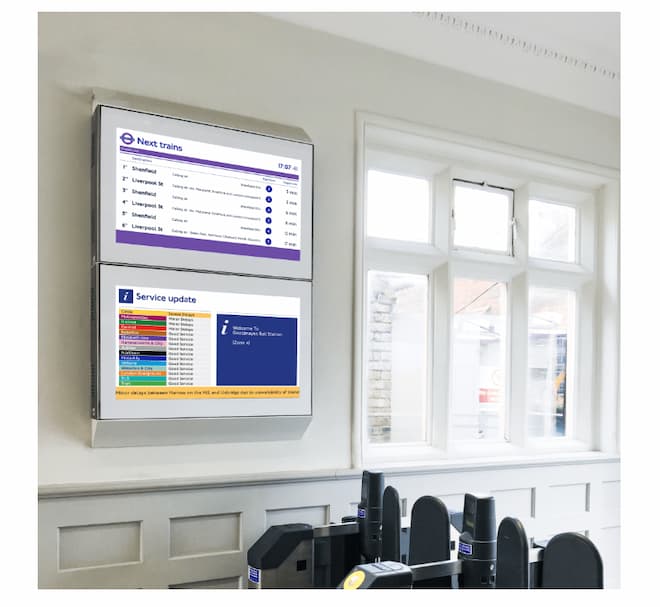
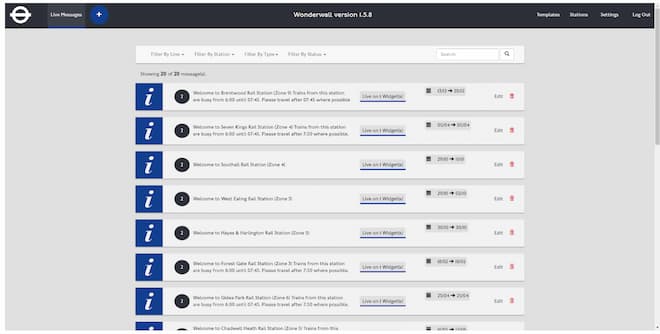
The new Elizabeth line has been a long time in the making, but it's finally open to the public and is expected to allow more than 1.5 million to be closer to their places of work in the West End, Canary Wharf, and the City. To help make things as smooth as possible for travellers, Acquire Digital created the live status screens at the stations along the line, using their industry-leading Acquire Editor software.

In this instance, these screens provide information on train delays, cancellations, and changes in service so that people can plan their journeys accordingly.

click for full size

click for full size

click for full size

click for full size

The project was a collaboration between Acquire Digital and Worldline to deliver the solution for Transport for London, to update the UI design and to the new Elizabeth line branding. Using a specifically modified version of Acquire’s digital signage messaging CMS, the screens are connected to several APIs to collect data from different train operating companies and TFL itself. The CMS then converts this data from the different providers into a standardised, uniform feed which is presented to the travellers entering an existing the stations. The information is structured to allow people to quickly view and understand everything about the station and connections in their busy
commutes.

The displays are designed to provide travellers with this important information on travel statuses and really play a key part in helping to improve the overall passenger experience.

CEO of Acquire Digital, Neil Farr had this to say about the project “It has been, and continues to be, a great honour for Acquire Digital to be supplying key solutions to assist travellers on the oldest underground transport network in the world. It was a pleasure to provide the  London Underground with an updated solution that celebrates the Queen’s Jubilee”

What about when all doesn’t go to plan?

Using the specifically modified CMS that connects via several APIs to live data feeds, the system intelligently displays content on the screens using a combination of rules and TFL can push alerts and updates to any of the units across the transport network, promptly and efficiently. This truly helps keep travellers in the know in real-time. It can even minimise the impact of incidents if travellers can re-route accordingly before arriving at the bottleneck.

click for full size

click for full size

Acquire Digital has also created onward travel screens for people leaving the station. These screens show local maps and live public transport information, whether that be by bus, taxi, or water taxi. Multimodal transport information was a key requirement for TFL, and Acquire Digital were pleased that they successfully incorporated it into the CMS with ease.

About the Elizabeth line

Crossrail Ltd.’s new railway was a much-anticipated addition to the transportation infrastructure of London. Spanning more than 100km, the railway will stop at 41 accessible stations – 10 of them new – and is expected to serve up to 200 million people each year.

The new railway will connect London's East End with its West End, as well as providing links to Heathrow Airport and the London Underground network. In addition, the new railway will ease congestion on existing lines and provide greater capacity for future growth.

This is a fantastic use of technology, and it will be exciting to see how it helps improve the overall passenger travelling experience.

About Acquire Digital

Acquire Digital is a global leader in innovative digital signage software and interactive experiences, having delivered many transportation and travel projects. With over 24 years of experience in the visual solutions and digital signage markets, the company is known for its industry firsts. Its passion for reaching beyond the boundaries of digital signage has played a key role in shaping Acquire Digital into the globally recognized company it is today. The company produces world-class UX and UI solutions that create an interactive and immersive experience.

To find out how Acquire Digital can work their magic for your project, contact  Acquire  today!

CONTACT INFORMATION
Media Contact: Talveer Guram
Email: [email protected]
UK: +44 116 231 8921
USA: +1 844 291 3501
Web:

//www.acquiredigital.com
//www.facebook.com/acquiredig
//www.linkedin.com/company/acquire-digital
//twitter.com/acquiredigital
//www.instagram.com/acquiredigital/

More Digital Signage Software Posts

Digital Signage Awards – Best of Show Awards InfoComm 2022

Digital Signage Displays Outdoor

AV Technology, Digital Signage, and Tech&Learning Announce Winners of InfoComm Best of Show

 ) published 

Excerpt:

If anyone has been wondering if the AV industry is back, walking the show floor at InfoComm 2022 in Las Vegas, June 8 – 10 was enough to quell any doubt. As editors of Future’s AV TechnologyDigital SignageInstallation, MixSound & Video Contractor, and Tech & Learning, we able to predict the success by the sheer number of Best of Show product nominations received. The percentage of entries to the more than 550 InfoComm exhibitors was greater than any year in recent history.

We pride ourselves in the integrity of our award programs. Each publication engages with AV/IT professionals who are expert in the technologies specific to categories we assign to them to evaluate. Our judges are CTS-certified technology managers, integrators and consultants. Except for a handful of entries that were done virtually this year, each product is evaluated during the first two days of the show.

AV Technology, Digital Signage, and Tech&Learning announce the winners of InfoComm 2022 Best of Show.  .com/features/av-technology-digital-signage-and-techandlearning-announce-winners-of-infocomm-best-of-show” data-mce-href=”https://www.avnetwork.com/features/av-technology-digital-signage-and-techandlearning-announce-winners-of-infocomm-best-of-show”>Read the full article here.

A couple that caught our eye are:

Samsung EV Charger

IoTecha EV Charger – see post for Samsung pictures

Peerless-AV Xtreme 75 Outdoor Digital Signage Displays

Peerless-AV docs

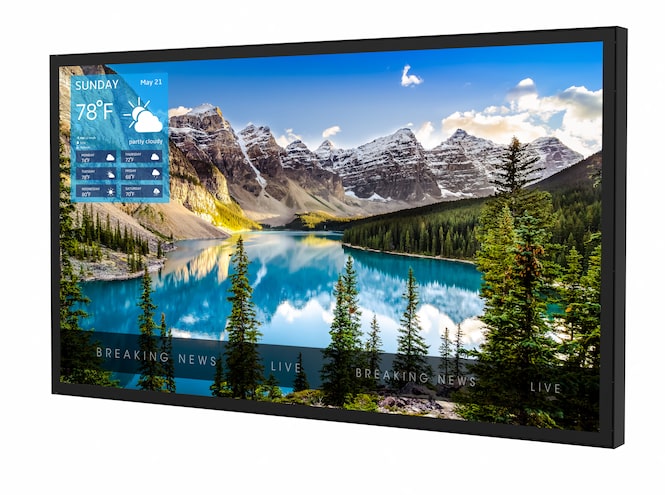
There has never been an outdoor daylight readable display built to withstand the harsh outdoor elements like the Peerless-AV® Xtreme™ High Bright. Featuring a fully sealed, IP66 Rated design and a patented Dynamic Thermal Transfer™ System, Xtreme High Bright Outdoor Displays are fully protected against water, dust, moisture, and even insects. The display’s cover glass is optically bonded, which increases the perceived contrast ratio and cuts down on glare, providing amazing picture quality even in direct sunlight. With an operating temperature range of -31°F to 140°F, Xtreme Displays are designed to thrive year-round outside, without worry of extreme hot or cold temperature waves. This High Bright line of commercial displays offer 2500nits of light output to combat high ambient lighting conditions, while the ambient light sensor automatically adjusts the display’s brightness to optimize the power consumption and enhance the viewing experience. Providing unmatched capabilities, Xtreme High Bright Outdoor Displays are the perfect digital signage or entertainment solution for any professional application.

XHB553 Sell Sheet

download


XHB553 User Guide

download


XHB553 CAD File

download


XHB652 Sell Sheet

download


XHB652 Wall Mount Sell Sheet

download


XHB652 User Guide

download


XHB652 CAD Drawing

download


Product Brochure

download

InfoComm Top Trends — Cindy Davis’ Top 5 Trends AV Technology

Panasonic Digital Signage Software Displays

InfoComm 2022 Top Trends – Digital Signage Displays

AV Technology’s Cindy Davis cites the following trends from InfoComm 2022 – 1: Collaboration; 2: Shipping Status 3: Solutions, Not Boxes; 4: Virtual Production / Extended Reality; 5: Audio Comes First in AV  — From AVTechnology June 2022

She calls out Panasonic booth which is nice. For more information contact [email protected]

Excerpts:

As I reviewed my mental notes from InfoComm 2022(opens in new tab), five trends coalesced. In the coming days, I will dive deeper into some of these topics, but I wanted to share this top-level with you. There were 557 exhibitors, and I could only see a fraction of them. I would love to hear from you about what trends you saw.

Solutions, Not Boxes

Crestron(opens in new tab)Kramer(opens in new tab)Legrand AV(opens in new tab), and Panasonic Connect(opens in new tab) booths were notably different at InfoComm 2022 than in the past. These booths were thoughtfully designed to present complete solutions representing specific applications or room layouts. Previous booth tours would comprise nicely presented black boxes with a litany of alphanumerics representing the model number and a bullet list of features. Kudos to these companies and others that are moving toward the ecosystem narrative versus the pieces and parts.

Crestron booth at InfoComm 2022

Crestron booth at InfoComm 2022 (Image credit: Future)

Kramer booth at InfoComm 2022

Kramer booth at InfoComm 2022 (Image credit: Future)

Panasonic Connect booth at InfoComm 2022

Panasonic Connect booth at InfoComm 2022 (Image credit: Future)

More Posts

Google Chrome Digital Signage News – Chrome Flex Intro

Google Chrome Digital Signage

Google Chrome Digital Signage News

From Kiosk Industry

Google Kiosks and Google Digital Signage

They made it official.  Periodically Google suddenly decides to kill a product but also sometimes refresh/resurrect a project.  In this case kiosks and digital signage are the keywords in their titles. Surprised me they used the word kiosk to a certain degree. And in the bottom of the hero graphic there are a list of companies which are announced partners.  We don’t see any kiosk companies. There might be some light wayfinding and even some NFC connectivity but this is about digital signage. It’s noteworthy that Samsung has used Tizen and its media player in transactional configuration now.  Matter of time for Brightsign.

We are scheduled to do an interview with the Google lead and will cover both kiosks and digital signage as two separate verticals.  Several digital signage companies listed (DOOH) but no wayfinding or kiosk partners.   For more information or to submit questions for our interviews email [email protected]

We were going thru posts and noticed our first blog entry on Google Digital Signage (and Kiosks too) was from April 2015.  Seven years and not a lot to show for it.

Hope all is well! Following up to let you know that today Google announced new changes to Chrome OS that will help drive revenue growth and amplify customer experiences for businesses across industries who operate kiosks. As businesses utilize kiosks and digital signage as two ways to provide better access to information and deliver faster transactions, we are excited to reveal:

    • A Kiosk & Signage Upgrade license for an end-to-end integrated solution for kiosks and digital signage: whether they’re deploying menu boards, check-in kiosks, digital signs, or anything in between, IT admins can reduce maintenance through automatic updates, ensure system security by blocking executables (Chrome OS has never had a reported ransomware attack or virus), monitor and manage devices remotely, and deploy validated kiosk solutions.
    • Partnership with 9 verified kiosk and digital signage partners
    • The ability to deploy the kiosk solutions on your existing hardware by first using Chrome OS Flex (currently in early access), a version of Chrome OS that can be installed on existing Windows and Mac hardware.

The Google lead who leads product management for Chrome OS commercial experiences is available to be interviewed on:

Details behind the new Chrome OS capabilities and specific use cases across industries

How the integrated tech solutions work to benefit both kiosk employees and their customers

Links

  • Early Access To Google Chrome OS Flex
  • News Release by Google
  • Digital Signage perspective by sixteen-nine
  • Trison perspective from Sixteen Nine
    • Critchley notes 2015 intro
    • Notes higher problem incidence using Windows to just display content
    • Conclusions — Chrome OS doesn’t do it all, yet. We still need to use Windows for 6-output devices, or similar edge use-cases, but, the recently launched Chrome OS Flex is now delivering a significant ability to enable these PC devices to run a fully verified Chrome OS environment, and migrate completely away from Windows. By installing Chrome OS Flex onto older PC or Mac devices, we are also able to extend the life of older networks significantly, and remove the additional overheads associated with Windows into the bargain.

Google Release

Here’s your sign. Customers and employees want to be delighted, and delivering those experiences is key. You may be wondering how to create these premium experiences, and you may have even tried to no avail in the past. Deploying kiosks and digital signage are two ways to help users with information, transactions, and more, but the route to delight hasn’t been so straightforward. Many solutions create more IT overhead, increase security risks, and are prone to instability.

Chrome OS alleviates these problems with an end-to-end solution for kiosks and digital signage. Whether you’re deploying menu boards, check-in kiosks, or anything in between, we’ve got your back – and the platform for it. With Chrome OS, you can:

  • Reduce maintenance with a modern, reliable operating system
  • Ensure system and data security with zero reported ransomware attacks
  • Monitor, control, and manage devices remotely
  • Deploy validated kiosk & signage solutions

And to further lead you toward modern experiences, we’re announcing some new tools:

  • Kiosk & Signage Upgrade, an affordable kiosk and signage management license for Chrome OS devices
  • New Chrome OS Flex certified devices great for kiosk & signage
  • A new Chrome Enterprise Recommended solution track for kiosk & signage

Introducing Kiosk & Signage Upgrade: Everything you need to remotely manage your devices

To guide you through the trials and tribulations of device management, we’re pleased to announce Kiosk & Signage Upgrade, a management license which – you guessed it – has everything your business needs to manage kiosk and signage devices running Chrome OS. Kiosk & Signage Upgrade will start at $25 per year, per device, and offer:

  • Comprehensive Security: Prevent data theft and attacks by remotely disabling or wiping devices that have been lost or stolen. Place devices in persistent enrollment, ensuring they are always enrolled in management, even if factory reset.
  • Simple Remote ManagementSimplify management of your organization’s device fleet with the easy-to-use, cloud-based Google Admin Console. Easily configure devices to boot directly into a kiosk or signage app, setup device policies, and access fleet insights.
  • Scalable Device Monitoring and Controls: Monitor the health and status of Chrome OS devices and get useful device reports to ensure devices are running smoothly. Remotely take screenshots, control, and monitor devices to quickly resolve issues and guarantee stability through Chrome Remote Desktop.
  • IT admin support: Contact Google for Chrome OS troubleshooting assistance with 24/7 support.

Kiosk & Signage Upgrade will be rolling out soon and will be available to order directly from Google or through our partners.


Install Chrome OS Flex on purpose-built devices or deploy new Chrome OS devices

We get it, you may have already invested in devices to delight your users, but that doesn’t mean there isn’t room for improvement. You can install Chrome OS Flex on purpose-built kiosk & signage devices or install on devices you’ve already deployed to get the benefits of Chrome OS. It’s easy to deploy and we’re actively certifying devices that meet the needs of kiosk and digital signage. We also have a variety of Chromeboxes, Chromebases, and Chromebooks great for kiosk & signage. Check out our device selectors to help you choose the best Chrome OS device for your use case or try Chrome OS Flex early access today.

Announcing 9 Google validated solutions to help you find your way

Providing a great experience isn’t just about the operating system running your kiosks and signage. It also requires content management services that make it easy to display valuable content across all of your devices. To ensure customers have access to solutions that are optimized for Chrome OS devices, we’re thrilled to announce the Kiosk and Digital Signage solution track and 9 new Chrome Enterprise Recommended solutions, including Arreya, Appspace, Comeen, MeldCX, Signagelive, StratosMedia, Trison, UPshow, and WAND Digital. These solution providers have worked directly with Google to ensure their content management services meet the high technical bar set by Google’s partner engineers, extending their product’s functionality, quality and security on Chrome OS.


We were looking for a digital signage platform to communicate updates to employees across our offices. Chrome OS and Comeen Play were a natural choice. Our IT department has been able to easily deploy and remotely manage this integrated solution, and our corporate communication team has been able to display updates to employees on more than 550 screens worldwide.Alan Riou
International Digital Communications Manager, Veolia

Get started today with an end to end solution for your kiosks and digital signage

Kiosk Ecosystem Banner

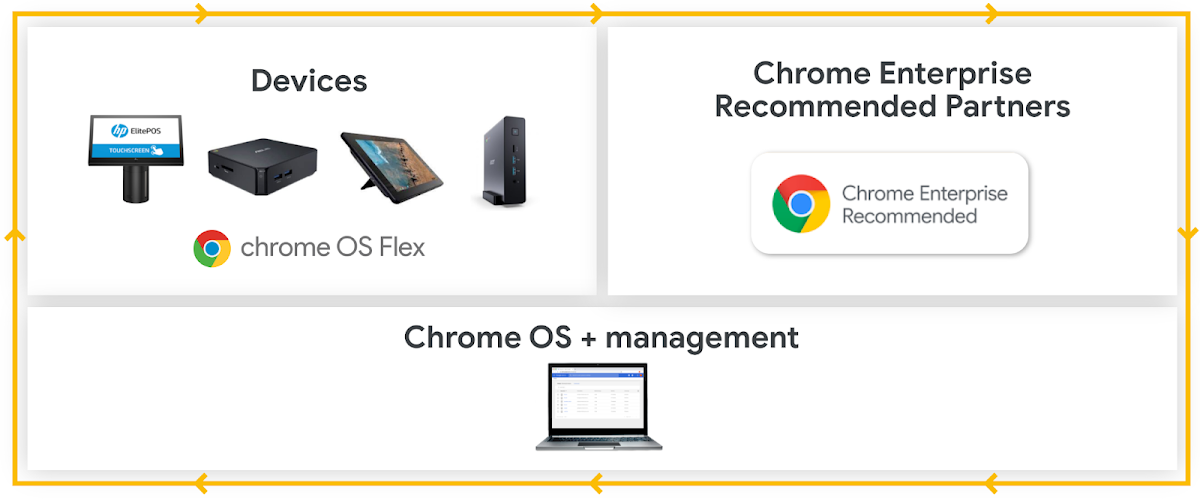
When you invest in Chrome OS, you don’t just get an operating system, you get an end-to-end solution. Chrome OS delivers a fully-integrated kiosk and digital signage solution with a wide range of devices, validated Chrome Enterprise Recommended partners, and remote management capabilities that are sure to delight customers and employees alike.

To learn more, don’t miss Chrome Enterprise Demo Day to hear how Chrome OS and our partners offer a modern kiosk & signage solution, try out early access to Chrome OS Flex on your devices, or contact us to get connected with a partner or our sales team.

More Posts