Multimodal Accessible Self-Service
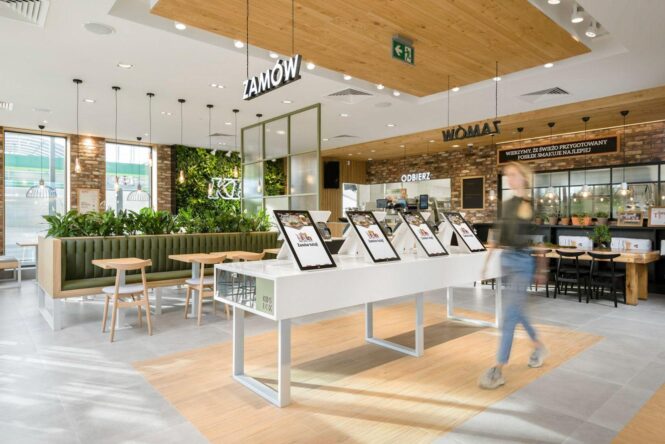
The New Reality of Retail Self-Service This retail TouchPoints article, written by Matt Ater of Vispero, argues that the retail industry has reached a “mission-critical” tipping point where self-serrvice technology must evolve from simple touchscreens tomultimodal, accessible interfacesthat work for everyone, regardless of physical ability or environmental circumstances. We agree. See The New Modality Stack: How Interactive Systems Are Moving Beyond the Touchscreen — Here is summary of Matt’s article with checklist 1. The Ubiquity of the “Invisible Kiosk” Self-service is no longer just a checkout lane; it includes pharmacy photo stations, hotel check-in screens, digital lockers, and even handheld payment devices. The common thread is that shoppers are expected to perform tasks independently and under time pressure, often without access to their own personal assistive tech (like screen readers). 2. The Problem with “Default” Design Most systems are designed for a “standard” user who can see, hear, and stand easily. This excludes: Permanent Disabilities: Blind shoppers cannot navigate silent touchscreens or verify totals. Situational Hurdles: Glare on screens, loud background noise, language barriers, or even a parent holding a crying child. 3. The Multimodal Solution The goal is Choice. Multimodal systems offer various ways to interact: Audio output via headphones. Tactile input (physical buttons/keypads). Voice guidance and adaptive interfaces. 4. The Business Case (Beyond Compliance) While regulations (especially in Europe) are tightening, Matt argues that inclusion is a competitive advantage: Operational Efficiency: Accessible kiosks prevent “friction points” where staff must leave their posts to help frustrated customers. Consumer Trust: Privacy in payments (like entering a PIN or choosing a tip via audio) provides dignity, which builds brand loyalty. The Bottom Line: If a system is unusable, customers leave and often don’t return. Key Insights & Analysis 1. Accessibility as “Universal Design” One of the strongest insights here is the shift from seeing accessibility as a “niche” feature to seeing it as robust UX (User Experience). Just as “curb cuts” on sidewalks help people with strollers and bikes as much as wheelchair users, multimodal kiosks help the person in a noisy, crowded store just as much as someone with a hearing impairment. 2. The Danger of “Checkbox” Accessibility Ater points out a significant “fail” in current tech: hardware that looks accessible but isn’t. A headphone jack that isn’t software-enabled is a “broken promise” that frustrates users more than having no jack at all. For retailers, this means the software layer is now just as important as the physical kiosk. 3. Privacy = Dignity In a world of increasing data sensitivity, the “payment” aspect is crucial. For a blind or low-vision shopper, having to dictate a PIN or a tip amount to a stranger is a breach of privacy. Moving toward private audio interfaces isn’t just a technical fix; it’s an ethical one that respects the customer’s autonomy. 4. The Future is “Invisible” Matt suggests that in five years, the best self-service will “fade into the background.” This implies a move toward Ambient Intelligence —systems that recognize user needs and adapt instantly without the user having to hunt for an “accessibility mode” button. Insight Note: This article highlights a shift in retail philosophy. We are moving away from “How can we automate this to save money?” toward “How can we automate this without losing customers?” The Multimodal Self-Service Checklist 1. Visual & Physical Accessibility [ ] Screen Clarity: Is the interface high-contrast? Does it remain readable under harsh overhead retail lighting or near windows (glare-resistant)? [ ] Reachable Design: Are all interactive elements (touchscreens, card slots, receipt printers) within the ADA-mandated reach range for a person using a wheelchair? [ ] No “Visual-Only” Cues: Does the system avoid relying solely on color (e.g., “Press the green button”) to convey meaning? 2. Audio & Speech Integration [ ] Functional Headphone Jack: Is there a standard 3.5mm jack? More importantly, does plugging in headphones automatically trigger a screen-reading voice-over? [ ] Volume Control: Can the user easily adjust the volume to overcome ambient store noise? [ ] Private Audio for Sensitive Data: Can a user hear their transaction total, tip options, and PIN prompts privately through headphones? [ ] Speech-to-Text/Voice Command: Does the system allow for basic voice navigation in quiet or semi-private environments? 3. Tactile & Input Feedback [ ] Physical Keypad/Nav: Is there a tactile peripheral (like a Braille-labeled keypad) for users who cannot use a flat touchscreen? [ ] Haptic/Audio Confirmation: Does the system provide a “beep” or a haptic vibration to confirm a successful scan or button press? [ ] Timeout Alerts: Does the system provide an audio warning before a session “times out” due to inactivity, giving the user a chance to ask for more time? 4. Software & Interface Logic [ ] Language Choice: Are the accessibility features available in all supported languages, or just the default? [ ] Simplification Mode: Is there an option for a “high-contrast” or “large-text” mode that simplifies the UI for users with cognitive or visual impairments? [ ] Real-Time Error Correction: If an item is scanned twice or a weight error occurs on the scale, does the system explain the error via audio? 5. Operational Support [ ] Staff Alert Integration: If a user is struggling, does the system notify a staff member discreetly so they can provide help without the customer having to wave them down? [ ] “Assist” Mode: Can a staff member take over the screen remotely or via a secondary interface to help clear a block without the user losing their privacy? Pro-Tip for Implementation The “Lab vs.Reality” Test: Don’t test this in a quiet office. Test it in a store at 5:00 PM on a Friday with music playing, carts rattling, and a line of people waiting. If a user can’t complete a transaction independently in that environment, the accessibility features aren’t fully functional yet. HIMSS Intersection… Read More »